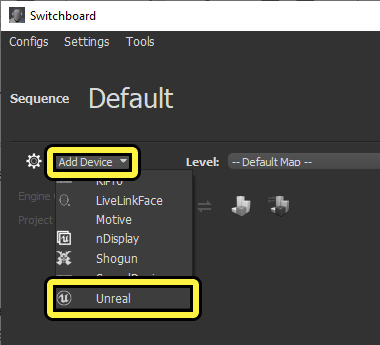
What the tool controls
Epic’s quick start introduces Switchboard as a way to connect to multiple devices. A SwitchboardListener runs on each controlled machine, while a configuration identifies the Unreal project and engine location. The documentation labels the feature Beta. nDisplay’s setup workflow uses Switchboard to launch the configured project on the display system.
Source: Switchboard Quick Start · nDisplay Overview
Keep the configuration legible
Atlas method
Use machine and configuration names that mean something to the crew. Document the engine build, project revision, and which machine has each role. A successful connection answers a network question; it does not establish that the correct content, camera state, or display configuration is running.
Start with the smallest representative system and keep a known-working configuration. Add complexity only after you can explain how to restore that baseline. The aim is not to avoid sophisticated setups; it is to make failures diagnosable while they are still cheap to investigate.
A preflight for the operator
Atlas checklist
Before handing control to the shooting team, confirm the intended project has launched and the expected image is on the correct outputs. Check the tracking input and the agreed timing indicators. Then rehearse returning to an approved setup after a change.
Treat stage control as part of the production network, not an invitation to expose listeners to the public internet. Ask the responsible engineer to approve access and network boundaries. This guide does not prescribe firewall changes or remote-access shortcuts.
- Confirm device identity, engine build, and content revision.
- Verify the image on the physical outputs.
- Keep a restore procedure the relief operator can follow.
Readiness is a verified configuration, not a green connection indicator.
Sources & evidence
Primary documentation establishes tool behavior or a reported production. Checklists and illustrative examples are Atlas editorial guidance, not results of independent testing. Match documentation to your installed version.
Source published: Not established · Retrieved 16 September 2026
Source published: Not established · Retrieved 16 September 2026