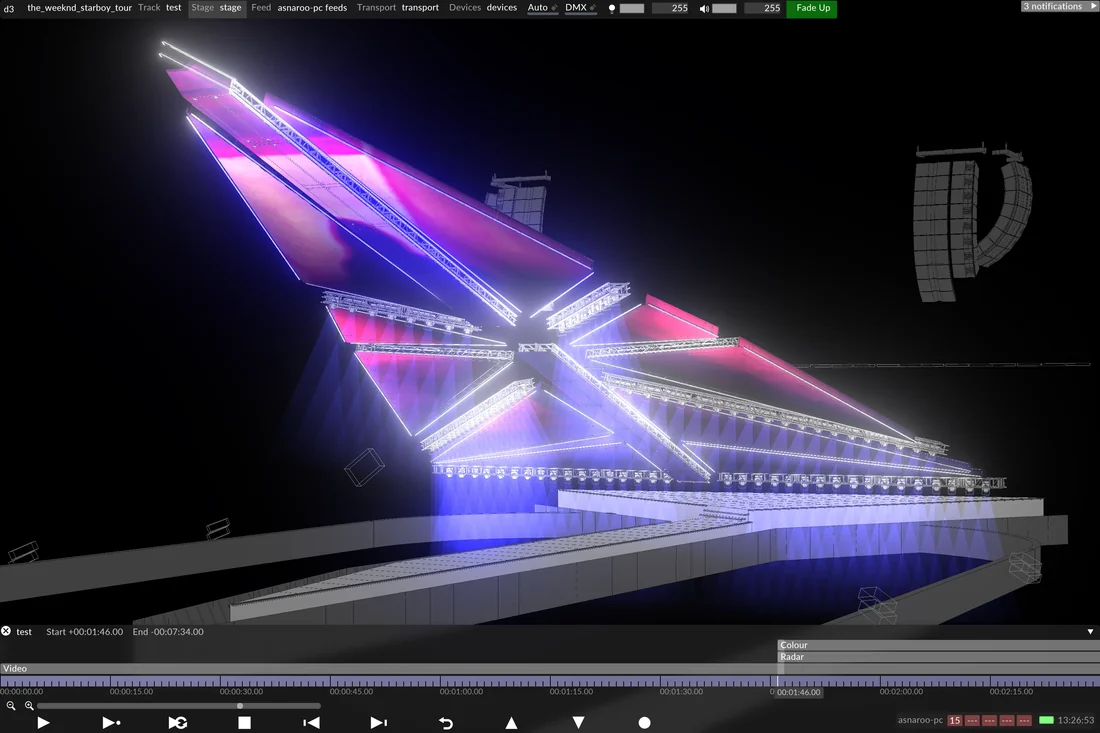
The stage
disguise's own Designer product page, describing the software as retrieved on 16 September 2026, positions Designer as the layer where a team “design, visualise, sequence and control” a show, from a single projector-mapped display to a full LED volume. The page describes real-time 3D visualization modes, including schematic and heatmap views and VR support, used to validate a stage's technical setup before load-in, alongside spatial content mapping onto LED screens or projection surfaces of any configuration, with features such as dynamic soft-edge blending between multiple projectors. This is a living product description, not a dated release, since disguise updates Designer on its own version schedule.
What the documents establish
disguise's own documentation, cross-checked against the Disguise User Guide, establishes that Designer and RenderStream are documented as separate systems, not one product. The User Guide's navigation lists Designer's scope, stage setup, content management, layers, timeline and transports, content mapping, networking, genlock configuration and colour management, as distinct top-level sections from RenderStream and from disguise's hardware ranges. RenderStream, per the product page, is the open protocol Designer uses to connect to third-party render engines such as Unreal Engine, Notch, Unity and TouchDesigner; Designer itself does not render the final image, it authors and sequences what those engines produce. Both vendor materials agree: Designer is a control and compositing layer, not a render engine.
The department view
The role built most directly around Designer is the show programmer or disguise operator working from the brain bar, who builds the timeline, maps content onto the physical LED surface and manages layers of video, audio and lighting cues in real time, often while several editors work the same project through Designer's stated multi-user support. That role sits between the render engine, producing the 3D content over RenderStream, and the physical stage, where genlock and DMX integrations documented in the User Guide must line up with camera and lighting departments. The trade-off is centralization: one authoring layer simplifies show-day operation, at the cost of making Designer a single point the stage's timing depends on.
What to check before you build
This is an editorial checklist, not disguise's own guidance. Confirm which Designer version a stage is running, since features on the current product page may not exist in an older license. Confirm separately how the render engine feeding Designer over RenderStream is licensed, since Designer's documentation describes the connection, not the engine's own settings. Confirm genlock and colour-management configuration against the User Guide's dedicated sections rather than assuming defaults match a specific LED panel.
- Which Designer version and license tier does this stage actually run, and does it match the features described here?
- Which render engine is connected over RenderStream, and is its own configuration documented separately from Designer's?
- Has genlock and colour management been checked against the User Guide's dedicated sections for this specific LED hardware?
Designer's own documentation is consistent about what it is: the authoring and control layer a volume's show runs through, not the engine that renders the image on the wall. Keeping that distinction explicit avoids treating a sequencing tool as if it were a renderer.
Sources & reading trail
disguise's own product page describing Designer's authoring, visualization, content-mapping and sequencing functions.
Source published: Not established · Retrieved: 16 September 2026
disguise's own documentation site listing Designer's feature sections as distinct from RenderStream and hardware documentation.
Source published: Not established · Retrieved: 16 September 2026
Vendor documentation, standards and reports establish the entry; the department view is Stagecraft Atlas editorial analysis. This retrospective draft does not imply the site published on the event date.